
“I subscribed to NordVPN’s 2-year plan.”
One important thing to watch out for is the high renewal price after two years.
NordVPN is a subscription service that automatically renews when the contract period ends.
Additionally, the renewal price is higher than the initial subscription, so it’s essential to be aware of this.
In this article, we will explain why NordVPN’s renewal price after two years is expensive and how to renew at a lower cost.
目次
NordVPN’s Renewal Price After 2 Years is Expensive
NordVPN’s renewal price after two years is high.
The reason is that the initial limited-time discount is not applied during automatic renewal, and the standard renewal price is charged instead.
Below is a comparison table of the regular pricing vs. the first-time discount pricing for the Basic Plan based on different subscription periods.
| Regular price | First-time discounted price | Discount rate | |
|---|---|---|---|
| 1month | $12.99 | ー | 0% |
| 1year | $139.08 | $59.88 | 56%OFF |
| 2years | $278.16 | $81.36 | 70%OFF |
Prices are as of the time of writing (including tax).
If you continue with the 1-month plan for two years, the total payment will be $278.16.
However, if you subscribe to the 2-year plan from the beginning, the total cost will be $81.36, saving $196.80.
The Renewal Discount Rate is Low
If you selected the 1-year or 2-year plan when initially subscribing to NordVPN, the subscription renewal price will be charged upon automatic renewal.
As of the time of writing, the applicable renewal prices are as follows:
| Basic 1-year | $139.08 |
| Standard 1-year | $149.88 |
| Plus 1-year | $179.88 |
| Complete 1-year | $219.48 |
| Ultimate 1-year | $278.28 |
| Ultra 1-year | $316.68 |
| Prime 1-year | $371.88 |
When converting the Basic Plan’s 2-year plan and renewal price into a monthly cost:
- Initial subscription: $3.39/month
- Automatic renewal: $11.59/month
This means that after renewal, the monthly cost increases by $8.2 compared to the initial subscription price.
Although it is slightly cheaper than the regular price (without discount) of $12.99/month, the renewal price is still significantly higher compared to the first-time subscription.
Automatic Renewal is Not Covered by the Refund Guarantee
NordVPN offers a 30-day money-back guarantee.
This means that if you are not satisfied with NordVPN, you can request a full refund within 30 days for any reason.
However, automatic renewal is not covered by the refund guarantee.
This is also stated on NordVPN’s official website.
Refunds are only available under the money-back guarantee for the initial purchase. Once the subscription is renewed, refunds under the money-back guarantee will not be provided unless otherwise required by applicable law.
Source: NordVPN “General Terms of Service”

In other words, if you are charged due to automatic renewal, you will not be eligible for a refund, even if it is within 30 days.
How to Renew NordVPN at a Lower Price

If you want to avoid being charged a high renewal fee after two years of your initial NordVPN subscription, it is recommended to cancel and then resubscribe.
The steps are:
- Disable and cancel NordVPN’s automatic renewal
- Resubscribe to NordVPN
1. Disable and Cancel NordVPN’s Automatic Renewal
First, disable and cancel NordVPN’s automatic renewal.
Even after stopping the auto-renewal, you can continue using the service until the end of your current subscription period.
Therefore, it is recommended to complete this process in advance to avoid unexpected charges.
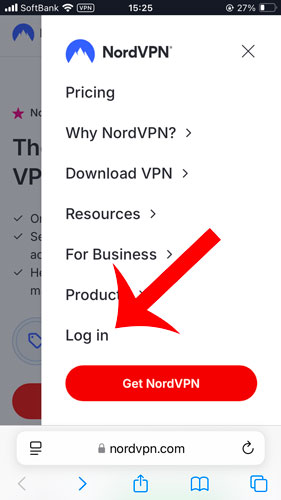
Go to Subscription
The NordVPN account page will be displayed.
Click “Billing information” → “Subscriptions”.
Tap “Cancel” in the Auto-renewal section.
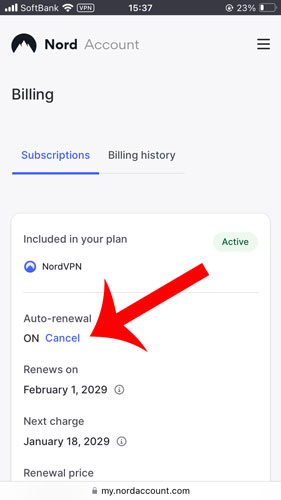
Disable and Cancel Auto-Renewal
Click “Cancel auto-renewal”.
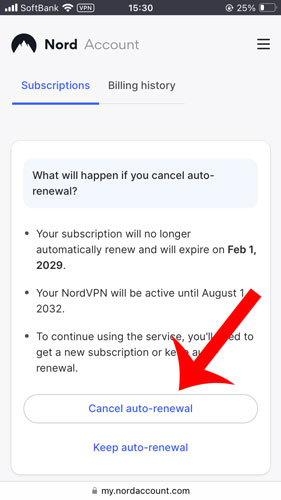
Confirm Auto-Renewal Cancellation
If the message “Automatic renewal has been canceled. You can turn it back on anytime to prevent service interruption.” appears at the top, the process is complete.
Additionally, check that the auto-renewal status is set to “Off”.
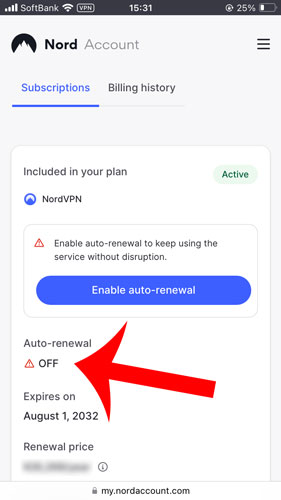
2. Resubscribe to NordVPN
Once automatic renewal is disabled, your subscription will be canceled at the end of the current billing period.
By subscribing to NordVPN again, you can take advantage of the discounted pricing.
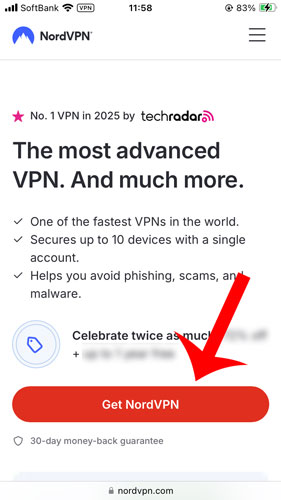
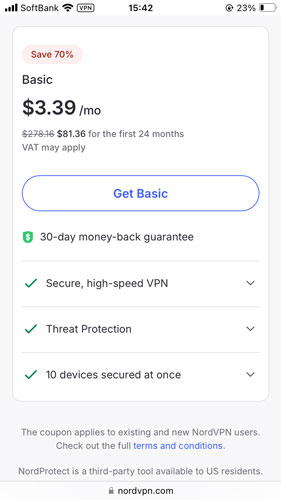
Select a Plan
Choose a NordVPN subscription plan.
For the lowest price, the 2-year Basic Plan is recommended.
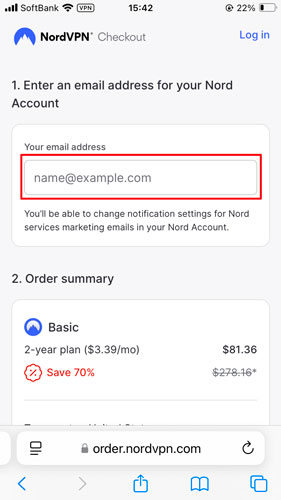
Create an Account and Select a Payment Method
For new subscribers, enter your email address to create an account.
Then, choose a payment method from the following options:
- Credit or Debit Card
- PayPay
- PayPal
- Google Pay
- UnionPay
- Cryptocurrency
Activate Your Account
You will receive an email from NordVPN at the address you entered.
Click the “Activate Your Account” link in the email to complete the activation process.
Set Your NordVPN Password
Create a password for logging into your NordVPN account.
Tip: It is recommended to write down your password to avoid forgetting it.
Conclusion
When you subscribe to NordVPN, your plan will automatically renew unless you manually cancel it.
During auto-renewal, the subscription renewal price (which does not include the initial discount) will be applied, resulting in a higher fee.
If you want to continue using NordVPN at a lower price after two years, it is recommended to cancel your subscription first and then resubscribe.


If you paid by credit card, the renewal fee may be automatically deducted without you realizing it, so caution is needed.