
When launching the PC version of NordVPN,
Background processes aren’t running
Start them manually to launch the app.Allowing the background processes will let you skip this step next time.
Allow background processes (Recommended)
a popup error message appears.
What does this error mean, and is it safe to allow it?
In this article, we will explain the “NordVPN background process is not running” error in detail.
目次
What Does the “NordVPN Background Process is Not Running” Error Mean?
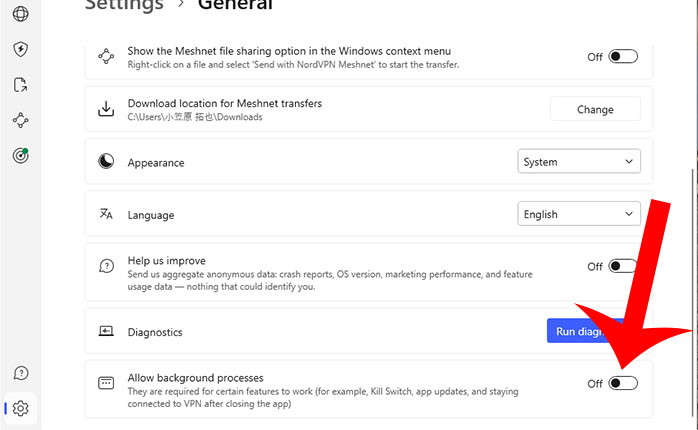
The “NordVPN background process is not running” error appears when the “Allow background processes” setting is turned off in the general settings.
To enable this setting:
- Open the NordVPN app.
- Click on the gear icon in the bottom left corner.
- Go to “General” and enable “Allow background processes”.
What is “Allow Background Processes” in NordVPN?
The “Allow Background Processes” setting in NordVPN allows the app to continue running even after it is closed.
This setting is available on the PC version of NordVPN.
In the NordVPN settings screen, it is explained as follows:
They are required for certain features to work (for example,Kill Switch,app updates,and staying connecterd to VPN after closing the app)
Specific Features
Enabling “Allow Background Processes” allows you to use certain features even when the NordVPN app is closed and not visible on the screen or taskbar.
| VPN Functionality | It is a feature that encrypts internet traffic to enhance security. |
| Kill Switch | It is a feature that automatically blocks internet access if the VPN connection is disconnected for any reason. |
| App Update | It is a feature that keeps the NordVPN app updated to the latest version at all times. |

If you want to enhance internet security with NordVPN’s VPN connection, enabling “Allow Background Processes” is essential.
If this setting is turned off, some NordVPN features will be restricted, so be sure to keep it enabled.
Frequently Asked Questions (FAQ) About NordVPN Background Processes
Here, we will summarize common questions related to NordVPN’s background processes.
Q: How Much Memory Does NordVPN Consume When Running in the Background?
In my environment, NordVPN consumed 35.6MB of memory when running in the background.
To check NordVPN’s memory usage:
- Right-click on the taskbar and open “Task Manager”.
- Look for NordVPN in the list and check the memory usage under the Memory column.
Q: Does the NordVPN app run in the background on smartphones?
Even after closing NordVPN, it continues running in the background and maintains the VPN connection.
To stop or close NordVPN in the background on an iPhone:
- Swipe up from the bottom of the screen (for SE series, double-tap the home button) to display the list of apps.
- Swipe up on the NordVPN app to close it.
However, on iPhone, the VPN function remains active due to the device’s built-in settings.
Therefore, even if you close or stop NordVPN in the background, the VPN connection will still be maintained.
To disconnect the VPN, you need to turn it off via:
- The Settings app → General → VPN & Device Management.
- The NordVPN app, or
Q: What Causes NordVPN Not to Run in the Background?
If NordVPN is not starting or running in the background, try the following solutions:
- Restart your computer
- Run diagnostics in the NordVPN app under Settings → General
- Reinstall NordVPN (for uninstall instructions, refer to NordVPN’s official guide)
Conclusion
In this article, we explained the “NordVPN background process is not running” error that appears when launching NordVPN.
This error occurs when the background process is not allowed in the PC version of NordVPN.
To fully utilize NordVPN’s features, enabling “Allow Background Processes” is necessary.
Unless you have a specific reason to disable it, keeping NordVPN’s background process running is recommended.


To remove the “NordVPN background process is not running” error, you need to turn on “Allow background processes” in the settings.