“I want to save as much as possible on my NordVPN subscription.”
One important factor to consider is the taxable country displayed in the order details.
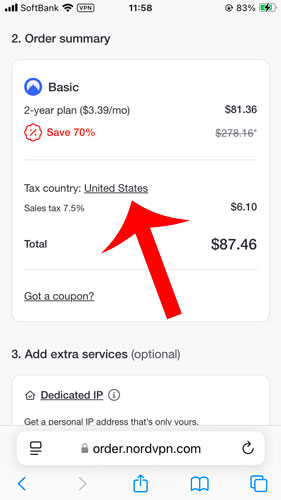
For example, when subscribing to NordVPN from the New York, USA, a 7.5% sales tax is applied, increasing the total payment by that percentage.
For an order amount of $81.36, an additional $6.10 in tax is added.
In this article, we will explain which countries are subject to tax for NordVPN and how you can subscribe with a 0% tax rate.
目次
Which Countries Are Subject to Tax for NordVPN?
Countries subject to tax for NordVPN are those where value-added tax (VAT) or sales tax applies.
VAT is a tax imposed on the purchase of goods and services and is said to be implemented in over 150 countries worldwide.
Countries Where VAT Applies
The principle of VAT (value-added tax) is that it is applied to goods and services consumed within a country.
This means that even if a product is purchased in USA, it may not be taxed if it is consumed abroad.
Tax Exemption Conditions in the USA
In the United States, sales tax is imposed at the state and local levels, rather than at the federal level. However, certain purchases may qualify for tax exemption under specific conditions.
1. Purchasing from a Sales Tax-Free State
Some U.S. states do not impose sales tax, meaning purchases made from these states may be tax-free. These states include:
- Delaware
- Montana
- Oregon
- New Hampshire
- Alaska (although some local municipalities impose sales tax)
If you purchase NordVPN using an address in one of these states, you may avoid sales tax.
2. Tax-Exempt Organizations & Individuals
Certain groups and individuals may qualify for tax exemption:
- Nonprofit organizations (e.g., charities, religious institutions)
- Government agencies
- Educational institutions
- Foreign diplomats with tax-exempt status
A valid tax-exempt certificate is usually required to claim this exemption.
3. Purchasing for Resale (Resale Certificates)
If a business is purchasing goods for resale, it can provide a resale certificate to avoid sales tax. However, this does not apply to personal purchases like NordVPN subscriptions.
4. Buying from a Seller That Doesn’t Collect Sales Tax
Some online sellers do not collect sales tax if they do not have a physical presence in the buyer’s state. However, this varies depending on state laws and the seller’s tax policies.
You Can Change the Taxable Country for NordVPN
NordVPN is a global company headquartered in Panama.
Therefore, it allows users to select their taxable country or region based on their residence, which can change the applicable tax rate.
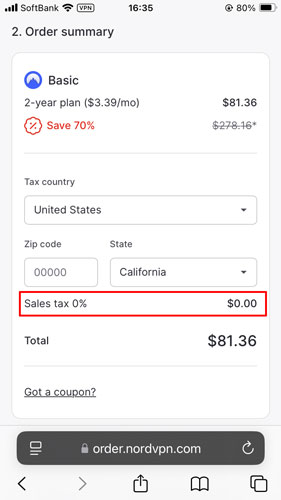
For example, if you switch your taxable country from the New York, USA to California, USA (which has a 0% tax rate), the cost of a basic 2-year plan can be reduced from $87.46 to $81.36 (a savings of $6.10).
Steps to Change the Taxable Country
Here, we will explain how to change the taxable country when subscribing to NordVPN.
Go to NordVPN’s order details.
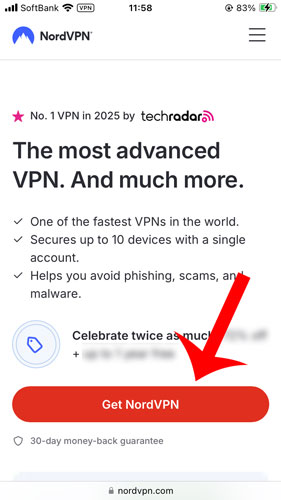
Access the NordVPN official website, then click “Get NordVPN”.
Select your plan and subscription period, and proceed to the order details page.
Click on the taxable country option.
By default, the taxable country is set to “United States”, with a 7.5% consumption tax applied.
To change the taxable country, click on “United States”.
Select the taxable country.
A list of taxable countries will be displayed, so choose one from the list.
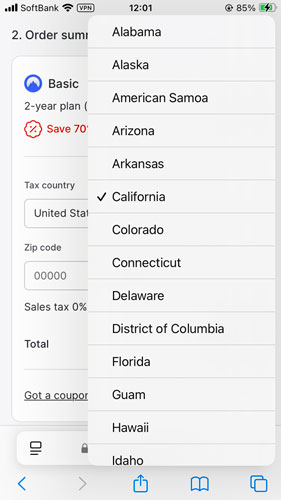
Check the tax rate.
Finally, verify the applied tax rate and complete the order process.
Conclusion
In this article, we explained in detail how you can freely change the taxable country when subscribing to NordVPN.
The taxable country can be adjusted based on your place of residence.
However, if you select a country different from your actual residence, it may violate legal regulations and NordVPN’s terms of service.
NordVPN’s official website also states:
“Additional charges: Sales tax”
To avoid any issues, it is recommended to correctly declare your taxable country when subscribing.


United States (Oregon, California, Colorado, Guam, etc.), Azerbaijan, Afghanistan, Algeria, Argentina, Andorra, Israel, Iraq, Oman, Kazakhstan, Qatar, Cambodia, Guatemala, Kuwait, Greenland, Cayman Islands, Costa Rica, Jamaica, Dominican Republic, Nauru, Nepal, Pakistan, Panama, Papua New Guinea, Bermuda, Palestine, Bangladesh, Philippines, Fiji, Brazil, Brunei, Peru, Macau, Myanmar, Laos, Hong Kong, China, Antarctica.