
“Which payment method for NordVPN is the best?”
Many people may be wondering the same thing.
NordVPN is the world’s No.1 VPN service, used by over 14 million people worldwide.
Since it is a foreign company based in Panama, it offers several payment options that are not commonly seen in USA.
In this article, we’ll introduce the recommended payment methods for NordVPN and what you should know about each option.
目次
NordVPN offers five different payment methods.
NordVPN offers five main payment options for its users.
1.Credit Card
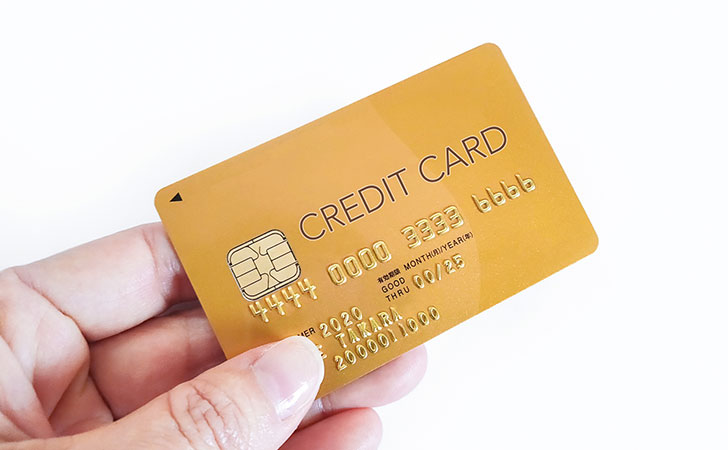
NordVPN supports payments via credit cards (debit cards are also accepted).
Credit cards are the most widely used cashless payment method in Japan, with approximately 86% of Japanese citizens holding at least one card.
The supported card brands are:
- VISA
- MasterCard
- JCB
- American Express
- DISCOVER
- UnionPay
In total, NordVPN accepts six major card brands.
2.PayPal

NordVPN supports payments through PayPal, the world’s No.1 online payment platform.
PayPal is available in over 200 countries and regions, supports more than 100 currencies (including 22 currencies in Japan), and has over 400 million registered accounts worldwide.
Before using PayPal, you’ll need to link one of the following to your PayPal account:
- Credit card (VISA, MasterCard, American Express, DISCOVER, JCB)
- Debit card
- Bank account (Mizuho Bank, Sumitomo Mitsui Banking Corporation, MUFG Bank, Japan Post Bank, Resona Bank, Saitama Resona Bank)
When paying for NordVPN, you simply log into your PayPal account to complete the transaction.
3.Apple Pay
NordVPN supports payments via Apple Pay, Apple’s secure mobile payment and digital wallet service.
Apple Pay, available on iPhone, iPad, Mac, and Apple Watch, allows users to make quick and secure payments without manually entering card details.
Before using Apple Pay for NordVPN, you’ll need to link one of the following to your Apple Wallet:
- Credit card (VISA, MasterCard, American Express, DISCOVER, JCB)
- Debit card
- Prepaid card
When subscribing to NordVPN, simply choose Apple Pay at checkout and authenticate with Face ID, Touch ID, or your device passcode to complete the transaction.
4.Google Pay
NordVPN supports payments via Google Pay, an online payment service provided by Google.
Google Pay, offered by the company best known for operating the world’s largest search engine and YouTube, currently has around 10 million users (as of the time of writing).
Before using Google Pay, you’ll need to link one of the following payment methods to your account:
- Credit card (VISA, MasterCard, American Express, DISCOVER, JCB)
- Debit card
- Prepaid card
When paying for NordVPN, simply log into your Google account to complete the transaction.
5.Cryptocurrency (Digital Currency)

NordVPN supports payments with cryptocurrencies (digital currencies).
Cryptocurrencies are a new form of currency traded online using blockchain technology, with a total market capitalization exceeding 100 trillion yen (as of the time of writing).
The supported cryptocurrencies include:
- Bitcoin (BTC)
- Ethereum (ETH)
- Ripple (XRP)
By choosing cryptocurrency as your payment method, you can enjoy added privacy and flexibility compared to traditional payment options.
Recommended Payment Methods for NordVPN
Let’s take a look at the recommended payment methods for NordVPN.
The most recommended option is credit card payment.

The most recommended payment method for NordVPN is using a credit card.
All you need to do is enter the details printed on your card — name, card number, expiration date, and CVV (security code) — to complete your payment.
No app installation or special setup is required.
Additionally, credit cards typically don’t incur fees when paying in full, and many offer 0.5–1% cashback or reward points based on your spending.
For example, if you use a Rakuten Card (1% cashback rate) to pay 15,000 yen, you would receive 150 yen worth of points.
Because it’s the most convenient method and offers cashback benefits, credit card payment is the best choice unless you have a specific reason to use another method.

If you don’t want to share your payment information directly with NordVPN, PayPal and Google Pay are recommended options.
All you need to do is log in to your account and select your preferred payment method to easily complete the transaction.
While NordVPN is a globally renowned VPN service, some users in Japan may feel uneasy since it’s not as familiar locally, raising concerns like “Will my credit card details be stolen?”
By choosing PayPal or Google Pay, your credit card information is never shared directly with NordVPN.
For example, when using PayPal, your credit card details are only stored with PayPal. With PayPal’s robust security measures, your card information is protected, and you can monitor your transactions in one place, making it easier to detect unauthorized activity.
Of course, even when paying through these services, you can still link your credit card and earn cashback or rewards points, just as you would with a direct payment.
For Maximum Privacy, Choose Cryptocurrency

If you prioritize anonymity when using NordVPN, paying with cryptocurrency is recommended.
Cryptocurrencies utilize blockchain technology, where all transaction histories are shared across the network in an encrypted form.
These records only include information such as which wallet address sent a certain amount of cryptocurrency to another, but they do not contain any personal details.
In contrast, when paying by credit card, personal information can be easily identified through the credit card company, which intermediates the transaction.
Therefore, if you wish to avoid government censorship or maintain a higher degree of privacy, paying with cryptocurrency is the preferred option.
Cryptocurrency Is Not Completely Anonymous
When converting cryptocurrency into fiat currency (such as yen or dollars) through a licensed crypto exchange, you are required to verify your identity.
Therefore, it’s not entirely impossible for your personal information to be traced.
How to Choose a Payment Method on NordVPN

From here, we’ll explain how to choose a payment method on NordVPN.
Access the Official NordVPN Website
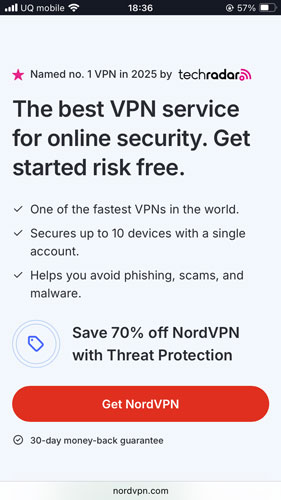
Go to the NordVPN official website website and click on “Purchase NordVPN.”
Choose a Subscription Plan
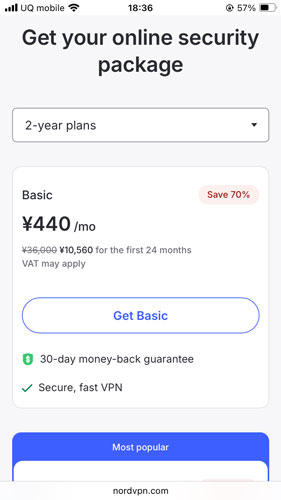
Select a subscription plan for NordVPN.
If you want to get the lowest price, the 2-year Standard Plan is recommended.
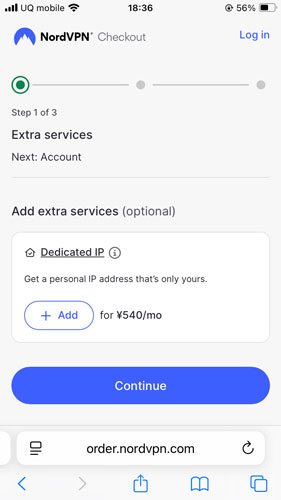
Create an Account and Choose Your Payment Method
If you’re signing up for a new subscription, enter your email address to create an account.
At this stage, you can choose your payment method from the following options:
Credit or Debit Card, PayPay, LINE Pay, PayPal, Google Pay, Amazon Pay, UnionPay, or Cryptocurrency.
After selecting your preferred method, simply follow the on-screen instructions to complete your NordVPN subscription.
Frequently Asked Questions (Q&A) About NordVPN Payment Methods
From here, we’ll cover some of the most common questions regarding NordVPN’s payment options.
In Conclusion
In this article, we’ve covered the various payment methods available for NordVPN.
NordVPN offers six main payment options, allowing users to choose the method that best suits their needs.
The most recommended option, credit card payment, supports major brands popular in Japan such as Visa, JCB, and Mastercard.
Additionally, with the rapid growth of mobile payment services, NordVPN also accepts PayPay, one of the most widely used smartphone payment methods in Japan.


When making a payment on NordVPN, it is recommended to avoid public Wi-Fi and use a secure internet connection.